How to Properly Sync Iphone Apps to Itunes?
How to Properly Sync Iphone Apps to Itunes?
Hi Friends,
If you try syncing your apps by clicking sync apps you will recieve the error message.
“Are you sure you want to sync applications? All existing applications and data on the iphone will be replaced with applications from this itunes library.
This will Delete all apps on your iphone. Instead First transfer your Iphone apps to itunes. Then you can sync without losing anything.
Right Click on your Iphone and click transfer purchases.
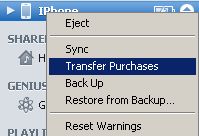
This will transfer all of the apps on your iphone to Itunes.
Now you can go to your iphone settings and sync apps and ignore the warning message. Now you can download apps from itunes and sync to your iphone.
Hopefully in future releases Itunes will make this process more user friendly.


Comments
Post a Comment